
Proven Firewall and Network Security Platform
The Cisco ASA Family of security devices protects corporate networks and data centers of all sizes. It provides users with highly secure access to data and network resources – anytime, anywhere, using any device. Cisco ASA devices represent more than 15 years of proven firewall and network security engineering and leadership, with more than 1 million security appliances deployed throughout the world.
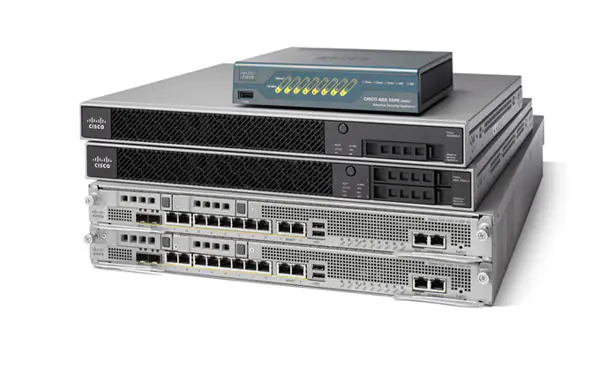
WHAT IS THE CISCO ASA?
In brief, Cisco ASA is a security device that combines firewall, antivirus, intrusion prevention, and virtual private network (VPN) capabilities. It provides proactive threat defense that stops attacks before they spread through the network.
An ASA is valuable and flexible in that it can be used as a security solution for both small and large networks.
The Cisco ASA 5500 series is Cisco’s follow up of the Cisco PIX 500 series firewall. However, the ASA is not just a pure hardware firewall. The Cisco ASA is a security device that combines firewall, antivirus, intrusion prevention, and virtual private network (VPN) capabilities. It provides proactive threat defense that stops attacks before they spread through the network. Therefore, the Cisco ASA firewall is the whole package, so to speak.
BEYOND BEING A FIREWALL, THE CISCO ASA CAN DO THE FOLLOWING AND MORE:
- antivirus
- antispam
- IDS/IPS engine
- VPN device
- SSL device
- content inspection
CISCO ASA BRINGS WIDE VARIETY OF FEATURES
You can get even more security functionality with add-on modules which offer a variety of features. The Cisco ASA firewall has one of the biggest market shares in the hardware firewall appliance market, together with Juniper Netscreen, Checkpoint, SonicWall, WatchGuard etc.
THE ASA 5500 SERIES HAS THE FOLLOWING MODELS:
- Cisco ASA 5505
- Cisco ASA 5510
- Cisco ASA 5520
- Cisco ASA 5525-X
- Cisco ASA 5540
- Cisco ASA 5550
- Cisco ASA 5580-20
- Cisco ASA 5580-40
ARCHITECTURE
The ASA software is based on Linux. It runs a single Executable and Linkable Format program called lina. This schedules processes internally rather than using the Linux facilities. In the boot sequence a boot loader called ROMMON (ROM monitor) starts, loads a Linux kernel, which then loads the lina_monitor, which then loads lina. The ROMMON also has a command line that can be used to load or select other software images and configurations. The names of firmware files includes a version indicator, -smp means it is for a symmetrical multiprocessor (and 64 bit architecture), and different parts also indicate if 3DES or AES is supported or not.
The ASA software has a similar interface to the Cisco IOS software on routers. There is a command line interface (CLI) that can be used to query operate or configure the device. In config mode the configuration statements are entered. The configuration is initially in memory as a running-config but would normally be saved to flash memory.

STATEFUL INSPECTION
When internal users make requests to the internet, an ASA saves session information so that when a valid response comes back, it can recognize and permit that traffic through. Stateful inspection is the mechanism that allows the ASA to do so.
With stateful inspection, you can have thousands of users all going out to the internet dynamically and allow all the return traffic while simultaneously stopping any traffic that’s initiated on the outside from coming in.
PACKET FILTERING
Packet filtering allows legitimate external users to make inbound requests to your web servers. An ASA protects internal networks by permitting valid packets into the DMZ — and only there.
With packet filtering set up on an ASA, internet users making valid requests can access public web servers. At the same time, we’re never allowing external users from the outside into our inside zone. That’s because everything we know about zone perspectives is maintained when dealing with packet filtering.
NAT AND PAT
An ASA can provide network address translation or port address translation so that all the devices sitting behind it appear to be on the private network. But requests to the internet get global routing addresses, and they’re swapped out when they come back into the network.
Network Address Translation (NAT) and Port Address Translation (PAT) is simply faking source IP addresses. The firewall will have a globally routable address like 18.26.3.4, but devices behind the ASA don’t have one. But as traffic passes through the ASA, it uses NAT or PAT to translate the source addresses into the ASA’s address and lie about where the request is coming from.

ASDM GRAPHICAL USER INTERFACE
The ASDM user interface is designed to provide easy access to the many features that the ASA supports.
To move efficiently throughout the ASDM user interface, you may use a combination of menus, the toolbar, dockable panes, and the left and right Navigation panes, which are described in the previous section. The available functions appear in a list of buttons below the Device List pane. An example list could include the following function buttons:
- Device Setup
- Firewall
- Botnet Traffic Filter
- Remote Access VPN
- Site to Site VPN
- Device Management
The list of function buttons that appears is based on the licensed features that you have purchased. Click each button to access the first pane in the selected function for either the Configuration view or the Monitoring view. The function buttons are not available in the Home view.